E2E testing with AWS Textract
Markus Tacker

The project
Stripe integration for nRF Cloud:
Creates Stripe invoices from nRF Cloud billing data
Every invoice is a legal document.
The invoicing pipeline
Very simplified:
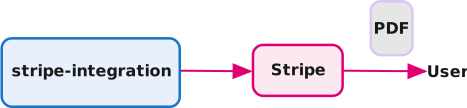
- Invoices are created in Stripe at the end of each month
- Stripe sends the PDF to the customer
The legal requirement
Norwegian law (Altinn) requires every sales document to carry:
- Seller business name
- Organization number with the
MVAsuffix Foretaksregisteret(the Enterprise Register line)- Buyer name and address
- Date of issue and payment deadline
- A clear description of each service
- Total price and remuneration
Finance department rules
- VAT only for Norwegian customers
- Currency conversion note: state the exchange rate, source (Norges Bank / Deutsche Bundesbank) and quote date
- NOK VAT in foreign currency: Norwegian customers billed in non-NOK still get VAT reported in NOK at the effective Norges Bank rate
- “All prices in NOK.”: footer on every NOK invoice (the
krsymbol is ambiguous) - Issue date: last day of the billed month (post-paid) / first day (pre-paid), due 30 days later
- Automatic-charge footer: charged invoices state the payment term in lieu of a due date
The catch
Invoices are rendered by Stripe, not by us.
- We create the invoice through the API
- Stripe renders the PDF from an invoice template
- The final document contains additional information we pass along when creating the invoice
How to test?
We cannot assert on rendered output with unit tests:
- our implementation only does the API calls
- multiple API calls needed to create an invoice (create customer, create invoice, …)
- API calls are not what the customer receives: they get a PDF!
- Finance does not read unit tests!
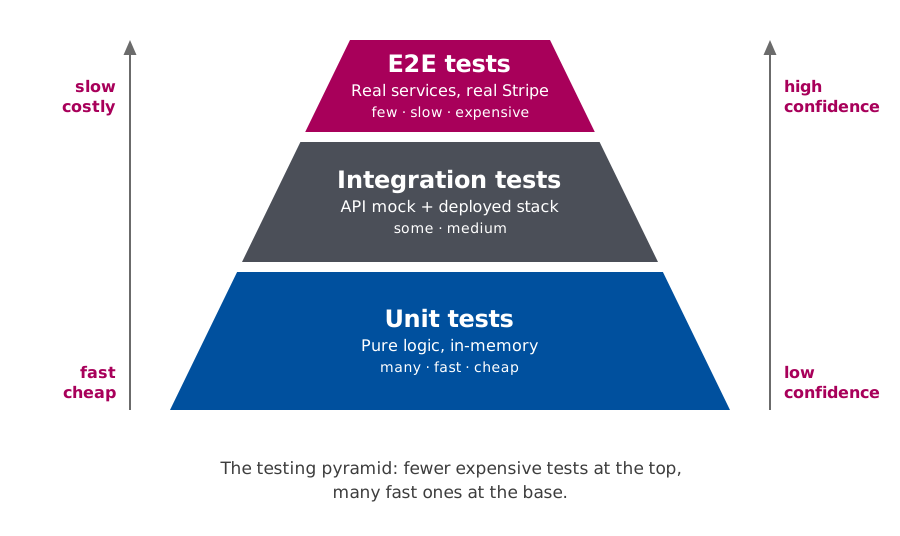
E2E tests — the top of the testing pyramid
- Drive the full pipeline through deployed AWS infrastructure
- Talk to the real Stripe sandbox — no mocking of the third party under test
- Assert on the rendered PDF via OCR
- Few, slow, expensive — but high confidence
The testing pyramid
The approach
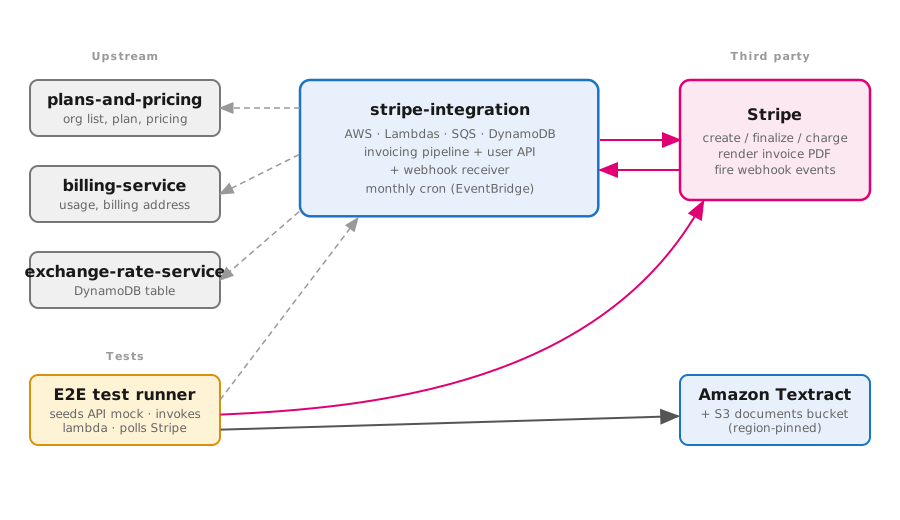
Run the real pipeline against the real Stripe sandbox:
- Deploy an ephemeral stack to AWS
- Seed the dependent services (mocked)
- Invoke the deployed lambda
- Let Stripe create and render the invoice
- Download the rendered PDF
- OCR it and assert on the text
Architecture
Why OCR?
- Stripe’s invoice PDFs embed fonts whose text layer maps punctuation
(
-,(,:) toNUL.
2026-06-01 → 2026\x0006\x0001Reading the text layer directly (e.g. with pdf.js) mangles values.
Amazon Textract OCRs the document — it reads the glyphs as they are drawn — and preserves punctuation, spaces and line breaks.
Also provides document structure (Layout, Forms, Tables, Queries, Signatures) but this is not needed for us.
1. Upload the PDF
2. Start text detection
import {
  StartDocumentTextDetectionCommand,
  TextractClient,
} from "@aws-sdk/client-textract";

const textract = new TextractClient();

const { JobId } = await textract.send(
  new StartDocumentTextDetectionCommand({
    DocumentLocation: {
      S3Object: { Bucket: documentsBucketName, Name: key },
    },
  }),
);
StartDocumentTextDetection kicks off an
asynchronous job. It returns a JobId
immediately and processes the document in the background.
3. Poll for the result
const { JobStatus, Blocks } = await waitForIt(async () => {
  const result = await textract.send(
    new GetDocumentTextDetectionCommand({ JobId }),
  );
  if (result.JobStatus === "IN_PROGRESS") throw new Error("not done yet");
  return result;
}, 40); // ~3 minutes of backoff

const lines = (Blocks ?? [])
  .filter((b) => b.BlockType === "LINE" && b.Text)
  .map((b) => b.Text);

const text = lines.join("\n");
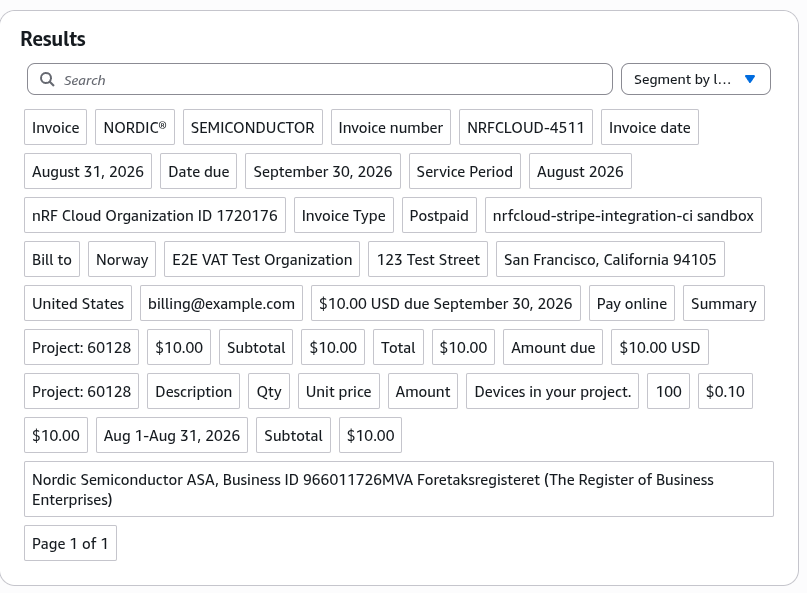
Example
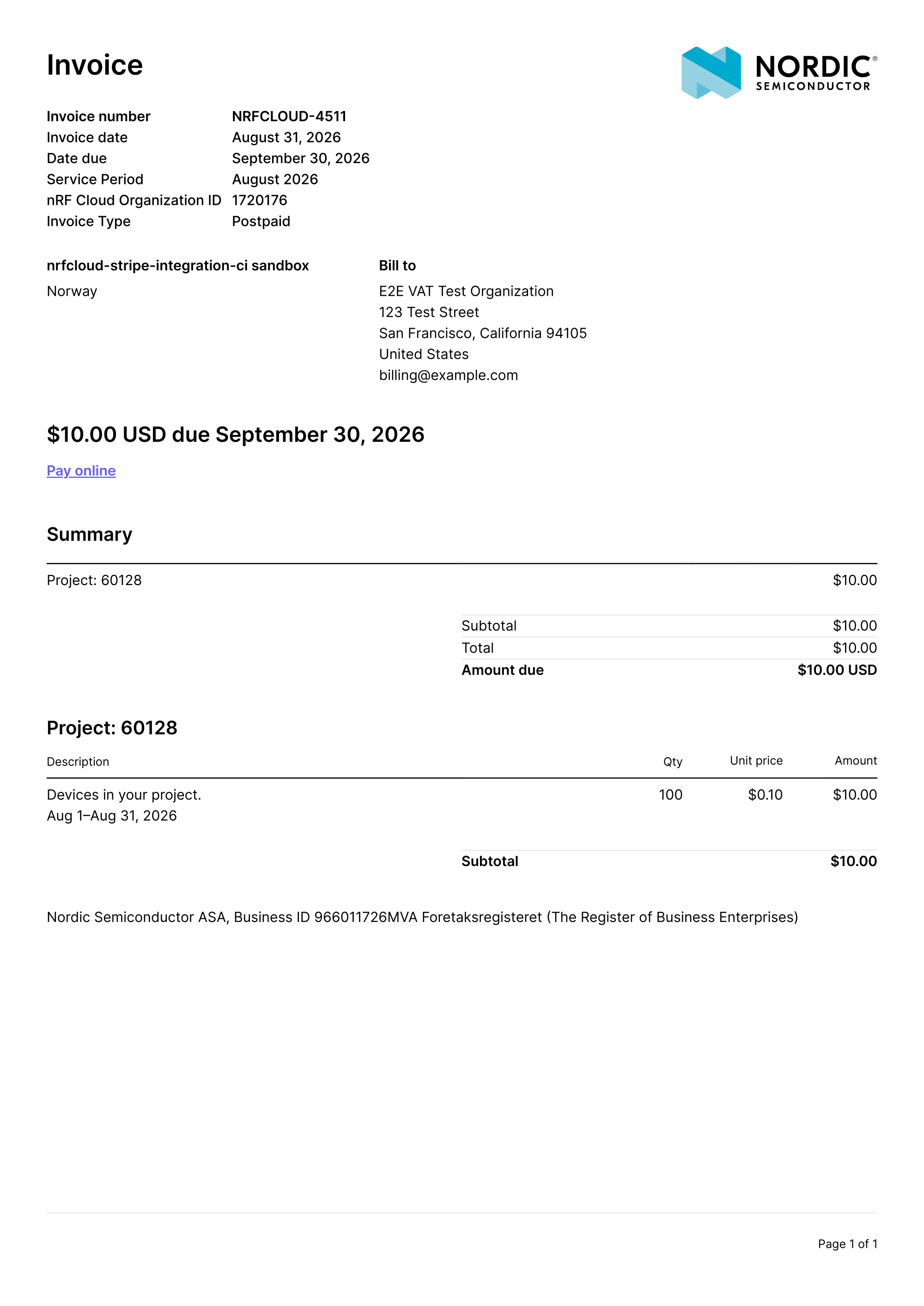
Raw text example
Visualized on AWS Console
Layout example
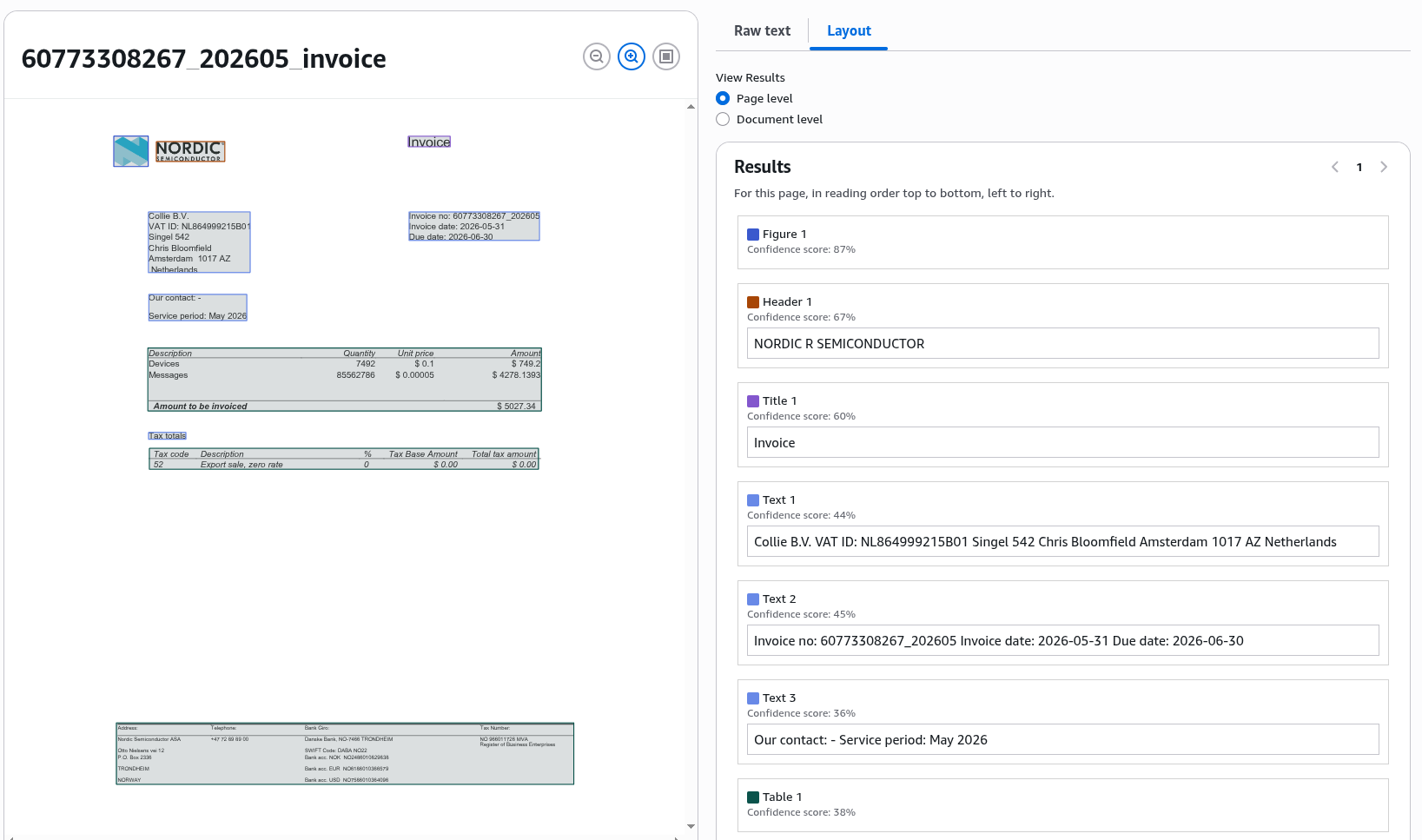
Visualized on AWS Console
What gets asserted
On the rendered PDF (OCR’d text):
- Altinn seller / buyer / date requirements
- NOK footer note presence (currency-dependent)
- Currency conversion rate note
- NOK VAT basis and amount for foreign-currency Norwegian sales
- Per-project grouping headers
CI strategy
OCR tests are slow (Textract) and cost money¹, so they run only when a change can affect invoice rendering:
ocr-e2e:
  needs: [stack-prefix, changes, tests]
  if: ${{ needs.changes.outputs.ocr == 'true' }}
  strategy:
    fail-fast: true
    max-parallel: 1
    matrix:
      spec:
        - chargedInvoiceDocument.ocr.spec.ts
        - vatDeclarationNorwegianCustomer.ocr.spec.ts
        - perProjectGrouping.ocr.spec.ts
        # … one job per spec
Each spec runs as its own job in a
fail-fast, max-parallel: 1 matrix, so the
first failure cancels the rest.
¹ 1 USD per 1.000 documents.
CI pipeline
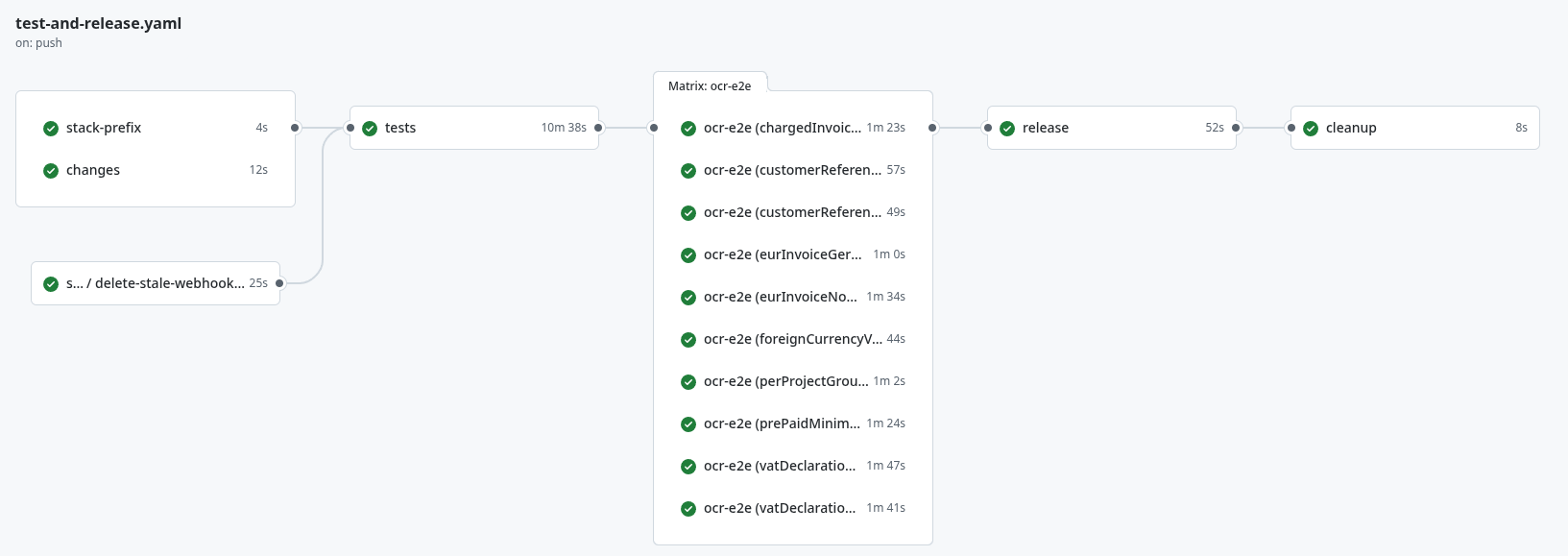
Artifacts for visual inspection
Every rendered invoice PDF is written to the git-ignored
e2e-invoices/ folder and uploaded as a CI artifact:
- name: Upload the rendered invoice PDF
  uses: actions/upload-artifact@v4
  with:
    name: e2e-invoices-${{ matrix.spec }}
    path: e2e-invoices/
    retention-days: 7
A failing assertion includes the full OCR’d text in its message, and the PDF is a click away.
Takeaways
- Test the real thing. Mocking the third party you integrate with defeats the purpose — you learn what it actually does.
- OCR what you cannot read. When a rendered document is the contract, read it back. Textract reads glyphs, not a broken text layer.
- Gate expensive tests. Detect whether a change can affect rendering, and only then pay for OCR.
- Keep the artifacts. Save the rendered PDFs so a failure is one click from a visual diagnosis.
- Clean up after yourself. The sandbox is shared; track and tear down what you create.
Thank you
Please share your feedback!